GitHub Pages
Websites for you and your projects.
User Site
username.github.io
Project Site
username.github.io/project
通过 GitHub Actions 部署 👍
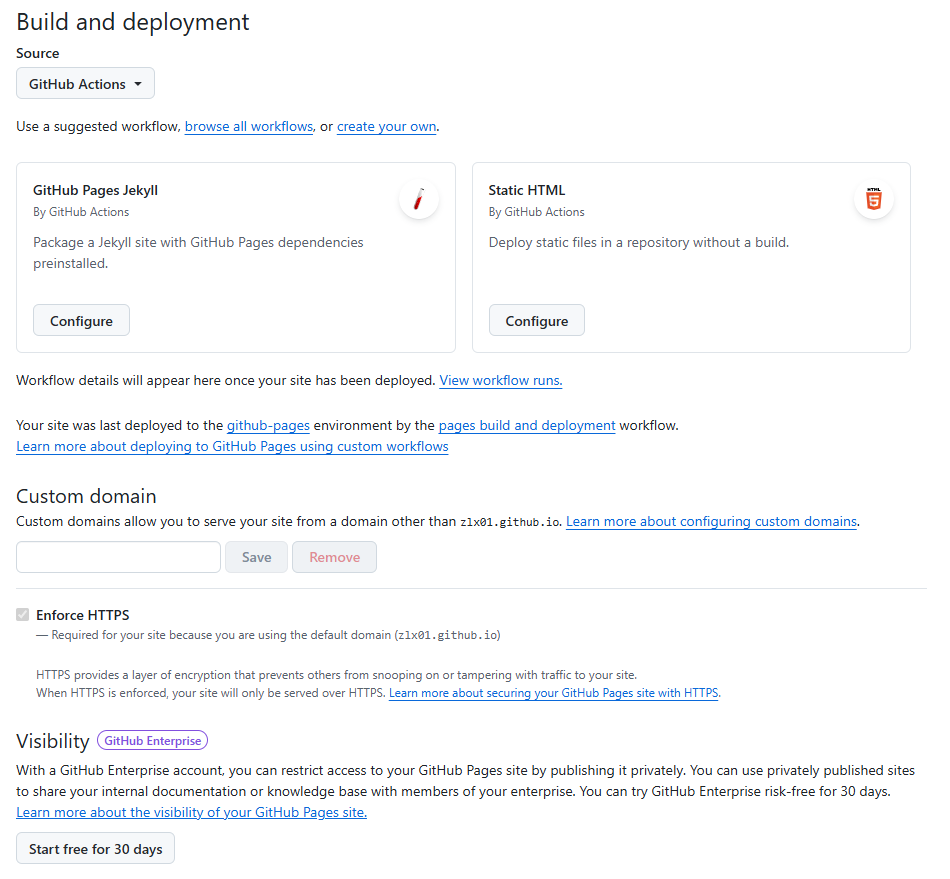
yaml
name: Deploy to GitHub Pages

on:
  push:
    branches: ["main"]
  workflow_dispatch:

permissions:
  contents: read
  pages: write
  id-token: write

concurrency:
  group: "pages"
  cancel-in-progress: true

jobs:
  build:
    runs-on: ubuntu-latest
    steps:
      - name: Checkout
        uses: actions/checkout@v4

      - name: Setup Node.js
        uses: actions/setup-node@v4
        with:
          node-version: 22
          cache: npm

      - name: Install dependencies
        run: npm ci

      - name: Build
        run: npm run build -- --base=/${{ github.event.repository.name }}/

      - name: Setup Pages
        uses: actions/configure-pages@v5

      - name: Upload artifact
        uses: actions/upload-pages-artifact@v3
        with:
          path: ./dist

  deploy:
    environment:
      name: github-pages
      url: ${{ steps.deployment.outputs.page_url }}
    runs-on: ubuntu-latest
    needs: build
    steps:
      - name: Deploy to GitHub Pages
        id: deployment
        uses: actions/deploy-pages@v4
通过gh-pages分支部署 👎
gh-pages:用于存放静态文件的分支,GitHub 会自动识别该分支并将其作为网站的源。
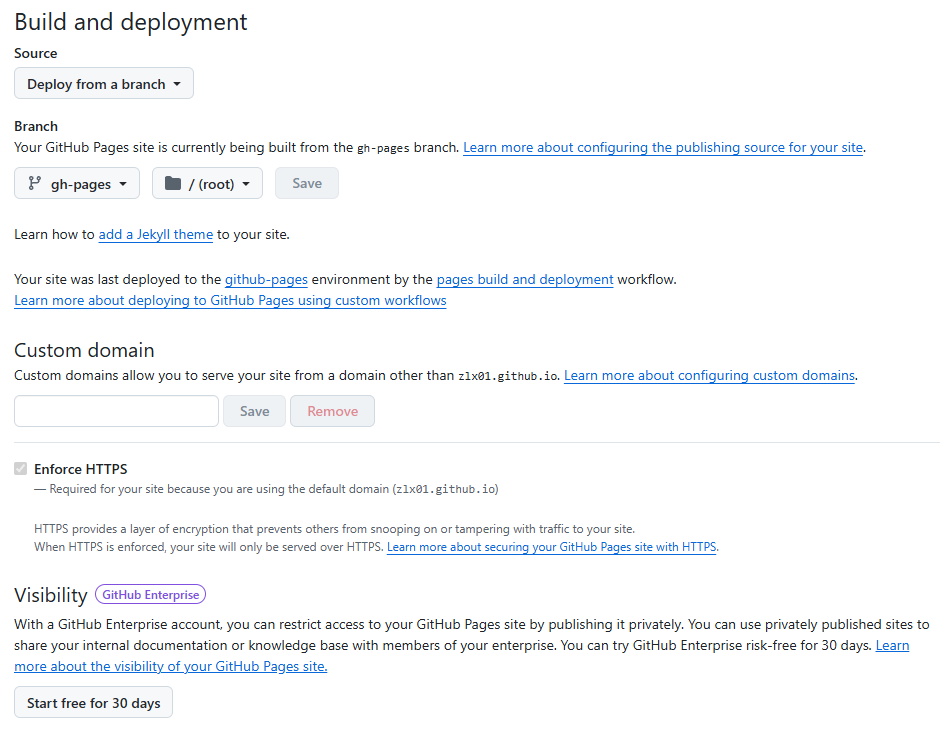
Examples
- https://github.com/zlx01/vuepress-deploy1
- https://github.com/zlx01/vuepress-deploy2
- https://github.com/zlx01/vitepress-deploy
- https://github.com/zlx01/vue2-deploy-gh-pages
- https://github.com/zlx01/vue3-deploy-gh-pages
- https://github.com/zlx01/react-deploy-gh-pages
直接push到gh-pages分支
- deploy from a branch
- vuepress部署示例:https://github.com/zlx01/vuepress-deploy1
bash
#!/usr/bin/env sh

# 确保脚本抛出遇到的错误
set -e

# 生成静态文件
npm run docs:build

# 进入生成的文件夹
cd docs/.vuepress/dist

# 如果是发布到自定义域名
# echo 'www.example.com' > CNAME

git init
git add -A
git commit -m 'deploy'

# 如果发布到 https://<USERNAME>.github.io
# git push -f git@github.com:<USERNAME>/<USERNAME>.github.io.git master
# 如果用 HTTPS
# git push -f https://github.com/<USERNAME>/<USERNAME>.github.io.git master

# 如果发布到 https://<USERNAME>.github.io/<REPO>
# git push -f git@github.com:<USERNAME>/<REPO>.git master:gh-pages
# 如果用 HTTPS
# git push -f https://github.com/<USERNAME>/<REPO>.git master:gh-pages
cd -
通过GitHub Actions自动部署到GitHub Pages 👍
- deploy from a branch
- vuepress部署示例:https://github.com/zlx01/vuepress-deploy2
- 部署目标:https://github.com/zlx01/vuepress-deploy2-target
yaml
name: Build and Deploy
on: [push]
jobs:
  build-and-deploy:
    runs-on: ubuntu-latest
    steps:
    - name: Checkout
      uses: actions/checkout@master

    - name: vuepress-deploy
      uses: jenkey2011/vuepress-deploy@master
      env:
        ACCESS_TOKEN: ${{ secrets.ACCESS_TOKEN }}
        TARGET_REPO: username/repo
        TARGET_BRANCH: master
        BUILD_SCRIPT: yarn && yarn docs:build
        BUILD_DIR: docs/.vuepress/dist
CNAME: https://www.xxx.com- deploy from a branch
- vitepress部署示例:https://github.com/zlx01/vitepress-deploy
yaml
name: Deploy

on:
  push:
    branches:
      - master

jobs:
  deploy:
    runs-on: ubuntu-latest
    steps:
      - uses: actions/checkout@v2
      - uses: actions/setup-node@v3
        with:
          node-version: 16
          cache: yarn
      - run: yarn install --frozen-lockfile

      - name: Build
        run: yarn docs:build

      - name: Deploy
        uses: peaceiris/actions-gh-pages@v3
        with:
          github_token: ${{ secrets.ACCESS_TOKEN }}
publish_dir: docs/.vitepress/dist- vue2部署示例:https://github.com/zlx01/vue2-deploy-gh-pages
- vue3部署示例:https://github.com/zlx01/vue3-deploy-gh-pages
- react部署示例:https://github.com/zlx01/react-deploy-gh-pages
yaml
name: build-deploy-gh-pages

on:
  push:
    branches:
      # 注意分支
      - master

env:
  TZ: Asia/Shanghai

jobs:
  build:
    runs-on: ubuntu-latest

    strategy:
      matrix:
        node-version: [16.x]

    steps:
      - name: Checkout
        uses: actions/checkout@v1
      - name: Use Node.js ${{ matrix.node-version }}
        uses: actions/setup-node@v1
        with:
          node-version: ${{ matrix.node-version }}
      - name: build
        # npm or yarn
        run: npm i && npm run build
      - name: git
        # 注意打包路径
        run: |
          cd dist
          git config --global user.name "${{github.actor}}"
          git config --global user.email "${{github.actor}}@users.noreply.github.com"
          git init
          git add .
          git commit -m "Deploy to GitHub Pages"
          git push --force https://username:${{secrets.ACCESS_TOKEN}}@github.com/${{github.repository}}.git master:gh-pages
          rm -fr .git