Docker
Docker: Accelerated Container Application Development
"Debug your app, not your environment."
"Develop faster. Run anywhere."
- 官方文档:https://docs.docker.com/
- 官方桌面客户端:https://www.docker.com/products/docker-desktop/
- 官方镜像仓库:https://hub.docker.com/
- http://dockerhub.com/ 301 Moved Permanently
- docker cheatsheet
- 学习仓库:https://github.com/zlx01/ok-docker
What is Docker?
先看官方文档怎么说。
Docker is an open platform for developing, shipping, and running applications.
Accelerate how you build, share, and run applications
Docker helps developers build, share, run, and verify applications anywhere — without tedious environment configuration or management.
- 应用容器引擎
Build
Spin up new environments quickly
Develop your own unique applications with Docker images and create multiple containers using Docker Compose.
Integrate with your existing tools
Docker works with all development tools such as VS Code, CircleCI, and GitHub.
Containerize applications for consistency
Run in any environment consistently from on-premises Kubernetes to AWS ECS, Azure ACI, Google GKE, and more.
Share
Build with verified, trusted content
Visit Docker Hub to browse Docker Trusted Content from our verified publishers or Docker Official Images.
Collaborate with your team
Pull and publish images from Hub for easy sharing between team members, organizations, or the broader community.
Secure your workspaces
Ensure best practices with image access management, registry access management, and private repositories.
Run
Cross-Platform Reliability
Ensure your applications run consistently across various environments, fostering reliability and eliminating compatibility issues.
Versatile Development Experience
Work in isolated containers with support for multiple languages, reducing conflicts between dependencies and providing a flexible development experience.
Effortless Deployment
Simplify your development process with streamlined deployment using a single command. Save time and effort while managing your applications seamlessly.
Verify
Stay vigilant with unified analysis
Address security issues before they hit production through a complete view of the software supply chain.
Do more with streamlined workflows
Build more efficiently with recommended remediation, resulting in simplified development processes.
Act quickly on prioritized actions
Follow key insights aligned with policy guardrails to stay ahead of security issues before they occur.
虚拟化技术
- 将计算机的各种硬件资源,例如CPU、内存、磁盘以及网络等,看做资源池,系统管理员可以对其进行重新分配,而不用考虑底层物理硬件
- 虚拟化技术解决的问题:1.高性能计算机硬件的产能过剩;2.把老旧的计算机硬件重新组合,作为一个整体的资源来用,化零为整。
- Linux平台的虚拟化产品:KVM,Xen,VMWare,VirtualBox
- Windows平台的虚拟化产品:Hyper V,VMWare,VirtualBox
- 虚拟化系统可以在宿主机上虚拟化出一套完整的硬件基础设施,配以操作系统,相当于虚拟出一台计算机
- 虚拟机对底层系统来说,就是一个文件。
- 虚拟机之间是相互隔离的。
- 虚拟化技术的缺点:资源占用多,一个虚拟机实例需要完整的操作系统及其附属应用,实际可能只需要部分功能和应用;冗余步骤多,启动慢
容器技术
- 容器,是一种轻量级的操作系统级的虚拟化,可以让用户在一个资源隔离的进程中运行应用及其依赖项。运行应用程序所必须的组件都讲打包成一个镜像并可以复用。
docker与虚拟机的比较
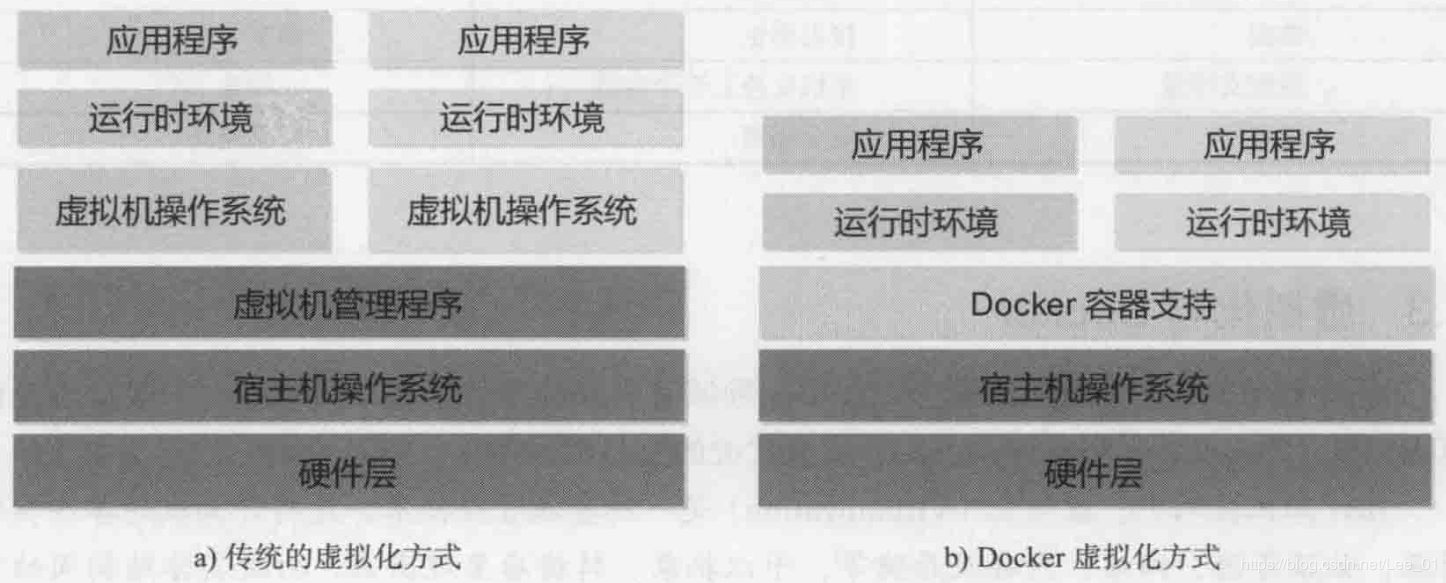
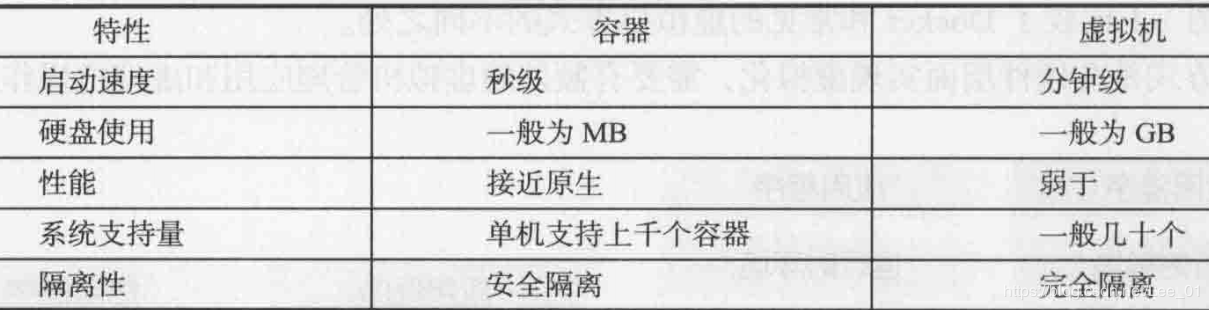
为什么需要docker?
- 解决的问题:开发环境和生产环境的一致性(依赖,版本,配置,网络。。。)
- 跨平台容易,方便部署,扩展,迁移。
- 一次构建、随处运行(Build once,Run everywhere)
- 举例:一般通过LAMP搭建网站时,往往需要很多配置环境的操作,当迁移系统到其他云平台时,需要重新部署和调试,而有了容器技术来打包应用,迁移系统就变得在新的云平台上启动容器那么简单了
docker在DevOps(开发/运维)中的优势?
- 敏捷:更快速的交付和部署
- 提高生产力:容器可以看做一个微服务,容器之间相互独立,可以独立升级,避免跨服务的依赖和冲突
- 节省资源:不需要额外的虚拟化管理程序支持
- 安全:容器之间的进程是相互隔离的(使用沙箱技术)
容器生态
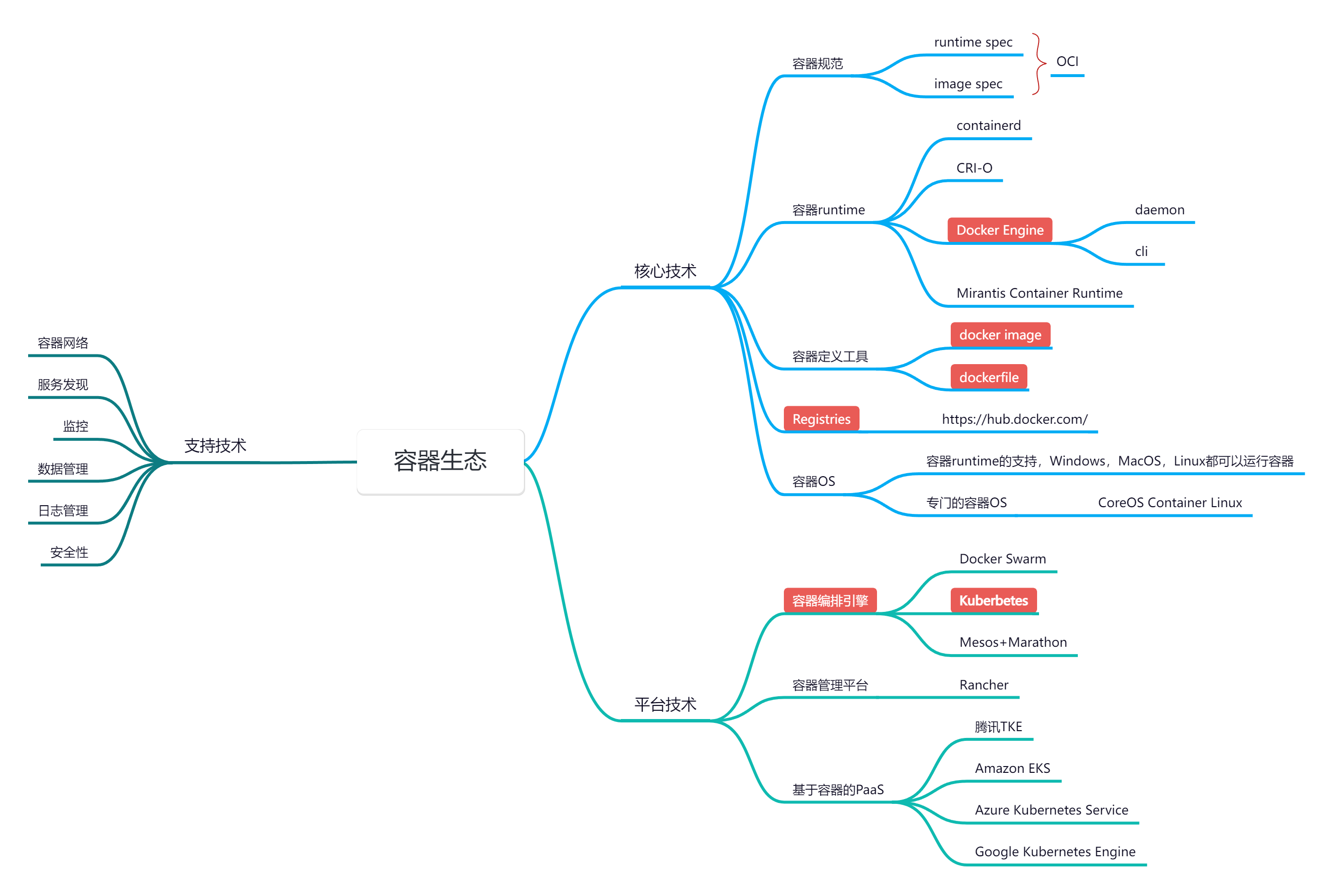
OCI (Open Container Initiative/开放容器标准)
- OCI Image Spec:容器镜像标准
- OCI Runtime Spec:容器运行标准